Sourcebook Saver
Streamline student research

Save, organize, cite.

Save any web page or PDF in one click. Keep your sources and notes in one place. Cite them in Google Docs in MLA, APA, Chicago and 10,000+ other styles.

Also: Read and annotate Teacher view

Research paper · Google Docs
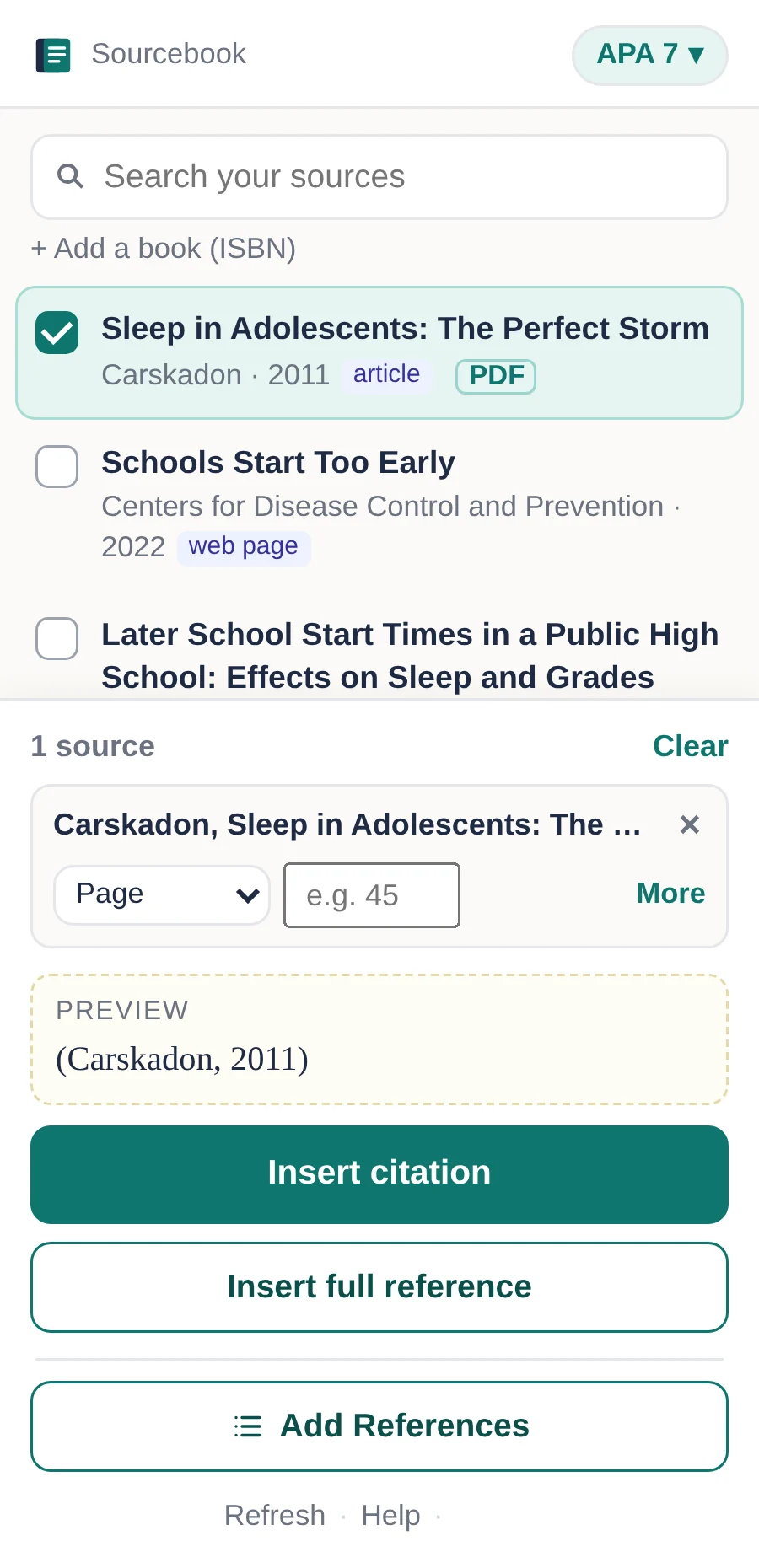
The Sourcebook Saver sidebar in Google Docs, listing saved sources ready to cite. Sample data.
The Sourcebook Saver popup in Chrome saying the page was saved, with its citation details.
How it works

Three steps, from source to reference list.

  1. Sourcebook Saver popup in Chrome: the page is saved, with its title, author and date.

    Find a source. Save it in one click.

    On any web page or PDF, click the Sourcebook Saver icon in your Chrome toolbar. It's saved with its citation details, in your Google Drive.

  2. The Sourcebook Saver sidebar in Google Docs with saved sources and the Insert citation button. Sample data.

    Cite it in Google Docs.

    In your doc, open Extensions → Sourcebook → Open Sourcebook. Your sources are in the sidebar. Pick one and press Insert citation for an in-text citation, or Insert full reference for the whole entry, with a line under it for your notes (great for an annotated bibliography).

  3. Works Cited

    Carskadon, Mary A. “Sleep in Adolescents: The Perfect Storm.” Pediatric Clinics of North America, vol. 58, no. 3, 2011, pp. 637–47.

    MLAAPAChicago+10,000 more

    Add your reference list.

    When you're done, press Add Works Cited (it says References or Bibliography in other styles). It lists only the sources you cited. Change the style any time and every citation updates.

Also in Sourcebook Saver

Two more ways to use Sourcebook Saver.

Sourcebook · My Sources
My Sources page listing saved sources with their tags, highlights and buttons to open each one. Sample data.
For students

Read and annotate

Open My Sources from the sidebar to read everything you saved on one page.

  • Read your saved PDFs.
  • Highlight PDFs, add notes and tags.
  • Insert a full reference for your annotated bibliography.

Your highlights come back in the Docs sidebar as quotes, ready to insert with their citation and page number.

Always free.

Sourcebook · Teacher view
Teacher view with class cards and a student list. Sample data.
Optional · For teachers

Teacher view

See your class's research in one place.

  • Syncs with your Google Classroom.
  • See each student's saved sources and what they've cited.
  • Export class data to a spreadsheet.

Try Teacher Pro for 30 days!

Coming soon

Get Sourcebook Saver

Sourcebook Saver is going through Chrome Web Store and Google Workspace Marketplace review. Coming soon.
  1. Add the Chrome extension from the Chrome Web Store.
  2. Add the Google Docs add-on from the Google Workspace Marketplace.

Your work stays in your Google Drive. No ads, no trackers, never sold. Privacy policy

Questions? We'd love to hear from you.

Students, teachers, schools and IT teams: write to us and a real person will answer.